How to Spot Phishing Emails: Nothing to Do with Fish!
A phishing attack is a form of social engineering where cyber criminals try to trick you by sending fake emails that appear to come from a trusted source, such as a business or colleague. These emails may ask you to confirm personal information, like passwords, or prompt you to open a malicious attachment that infects your computer with a virus or malware.
Phishing emails are one of the most common online threats. Knowing the tell-tale signs can help protect you and your organisation. Here are five ways to spot phishing attacks:
1. The Email Asks You to Confirm Personal Information
Phishing emails often look very authentic, mimicking the style of your organisation or well-known companies like banks. However, if the email requests sensitive information (e.g., banking details or login credentials) that you wouldn’t usually provide, it’s a red flag.
- Action: Do not reply or click any links.
- Tip: If you’re unsure whether the email is legitimate, search online and contact the organisation directly—never use contact information provided in the email.
2. The Web and Email Addresses Don’t Look Genuine
Phishers often create email addresses that closely resemble legitimate ones, but with small differences. For example, instead of “@Airbnb.com,” a phishing email might use “@mail.airbnb.work.”
- Action: Carefully inspect the sender's email address for unusual variations.
- Tip: Hover over any links before clicking to ensure they lead to a genuine site.
3. The Email is Poorly Written
Many phishing emails contain spelling mistakes, grammatical errors, or strange phrases. Legitimate companies carefully proofread their communications, so poor language quality can be a strong indicator of a phishing attempt.
- Interesting Fact: Some scam emails are poorly written on purpose to weed out more cautious recipients, leaving only the most susceptible.
4. There’s a Suspicious Attachment
Be cautious if an email from an unknown sender includes an unexpected attachment. Attachments could contain malware, viruses, or trojans that can harm your computer and network.
- Action: Don’t open any attachments unless you’re confident they’re safe.
- Tip: Use antivirus software to scan all attachments, even if they seem legitimate.
5. The Message is Designed to Make You Panic
Phishing emails often create a sense of urgency or fear. They may claim your account has been compromised or that it will be closed if you don’t act immediately. Take a moment to consider if the request is reasonable.
- Action: Avoid responding or clicking links if the email feels designed to cause alarm.
- Tip: If you’re unsure, contact the organisation through other means to verify.
Test your knowledge and examples
This following site from Google will give you a few examples https://phishingquiz.withGoogle.com/
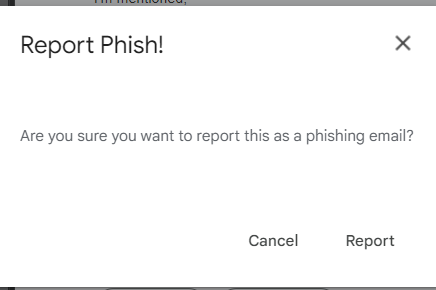
The Phish Alert Button is a tool that allows you to report potentially malicious emails, such as phishing emails.
If you receive a suspicious e-mail, click the Phish Alert button and the e-mail will be deleted from your inbox and forwarded to the ISP IT team for analysis.
When you report suspicious emails, you can help keep our organization safe from security threats. The reported emails are sent to our Global IT team for analysis, which will help keep us informed about potential phishing emails that all of you are receiving. Once the ISP IT team is aware of potential threats, we can help our organization stay safe from future attacks.
Remember: security is everyone's responsibility.
See the article linked below for information about where the Phish Alert Button is located and how to use the Phish Alert Button:
How Do I Use the Phish Alert Button in Gmail?
If you suspect an email may be Phishing or are uncertain, click on the email and then press the Phish alert button (Orange Anchor)
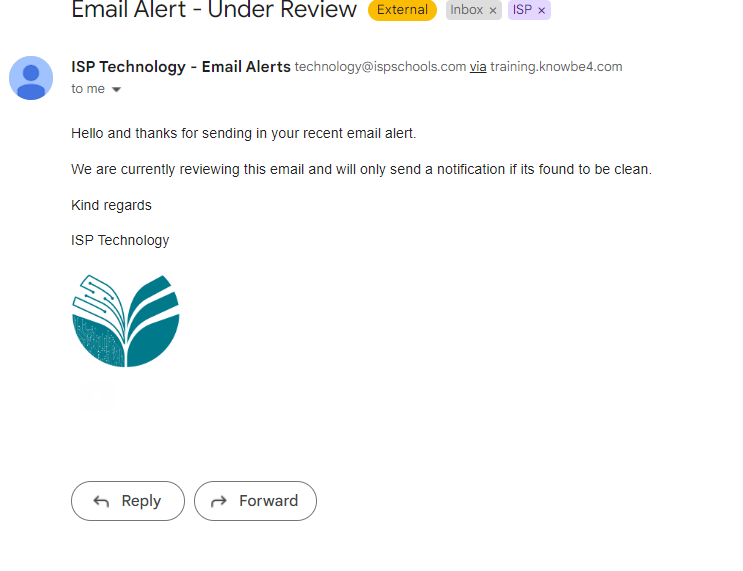
The email will then be removed from your inbox and several minutes later you should receive a mail similar to the one shown below.
Remember, by using this new button, you are helping to keep our school safe and defend it from cyber-attacks.